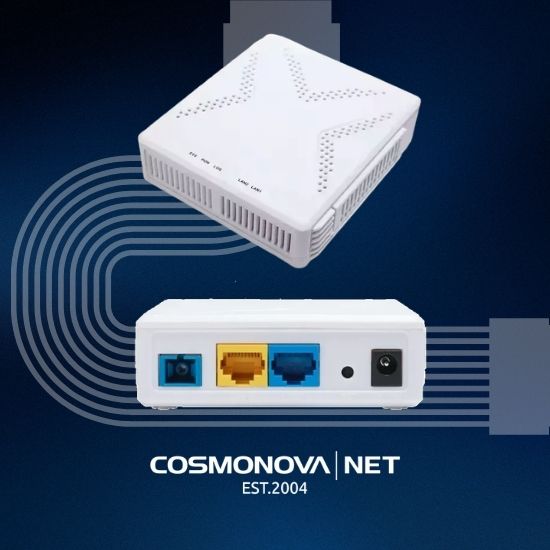
ONU 2.5 Gbps is an optical network terminal that converts the optical signal from fiber into an electrical signal for the end user, supporting data transfer speeds of up to 2.5 Gbps. Unlike standard terminals with a Gigabit Ethernet port (1 Gbps), a subscriber terminal with a 2.5 GbE port removes a bottleneck that limits real internet access speeds for modern applications.
Here is the core of the problem: a passive optical network (PON) can deliver 2.5 Gbps downstream and 1.25 Gbps upstream according to the ITU-T G.984 standards for GPON technology. However, if your ONU has an older 1 Gbps port, you can access only part of the available bandwidth. It is like having a high-speed highway but entering it through a narrow alley.
The ONU market was valued at $8.2 billion in 2025 and is growing at a compound annual rate of 8.3%. Demand is increasing as telecom operators and businesses recognize that 4K streaming, high-quality video conferencing, and cloud applications require real multi-gigabit speeds rather than theoretical ones.
Key Takeaway
The difference between a 2.5 Gbps ONU port and a 1 Gbps port is the difference between making full use of your optical network's potential and limiting the available speed. This is not a marketing trick but a physical hardware limitation.
Technical Specifications of ONU 2.5 Gbps
To choose the right terminal, you need to understand what you are buying. ONU technical specifications determine not only speed but also compatibility with your provider's network and operational reliability.
Data Transmission and Reception Speeds
GPON provides 2.5 Gbps downstream and 1.25 Gbps upstream. This asymmetric speed is typical of consumer internet, where downloading content is more important than uploading it.
However, having a 2.5 GbE port on an ONU does not guarantee that you will achieve that speed in practice. Actual performance depends on the provider's service profiles, backbone bandwidth, and the configuration of the OLT (Optical Line Terminal). Many providers limit speeds through software even when the hardware can support more.
A 2.5GE port is necessary to make full use of Wi-Fi 6, AR/VR, and 8K video streaming. If you plan to use these applications over the next 2–3 years, investing in an ONU 2.5 Gbps device may pay off quickly.
Supported GPON and EPON Standards
GPON (Gigabit Passive Optical Network) and EPON (Ethernet Passive Optical Network) are the two main passive optical network standards. Most Russian and European operators use GPON, while some operators, particularly in Asian countries, prefer EPON.
GPON technology provides shared 2.5 Gbps bandwidth for 64 users simultaneously across video, voice, and data services. This means theoretical capacity is shared among subscribers according to usage patterns and traffic priorities.
Dual-mode XPON terminals support both GPON and EPON, providing network flexibility. If you are unsure which standard your provider uses, an XPON terminal can help reduce the risk of incompatibility.
Interfaces and Ports
In addition to the optical port (SC or SC-APC connector) for fiber connection, an ONU 2.5 Gbps device has electrical interfaces for connecting subscriber network equipment. A standard configuration includes one 2.5GbE (RJ-45) port for the main data connection and one or two Gigabit Ethernet ports for backup equipment or additional devices.
Some models include built-in Wi-Fi, which is convenient for home networks. For corporate use and operator deployments, an ONU without Wi-Fi is often recommended because it simplifies security management and reduces electromagnetic emissions in sensitive networks.
The maximum ONU signal transmission distance can reach 20 km. This allows the equipment to operate a significant distance from the OLT, which is important for network deployments in suburban and rural areas.
Professional Tip
When choosing an ONU, look for DDM (Digital Diagnostic Monitoring), a feature that monitors optical parameters. It allows remote monitoring of fiber status and troubleshooting without physical access to the equipment.
GPON ONU Configuration: Step-by-Step Guide
Configuring an ONU 2.5 Gbps device requires an understanding of basic parameters and access to its management web interface. The process is not complicated, but attention to detail is important.
A network engineer connects an optical cable to an ONU terminal in a server room, working with an SC-APC connector, with other network devices and cable channels visible in the background.
Connecting the Optical Cable
The first step is physically connecting single-mode fiber to the ONU's optical port. An SC-APC connector is used, although SC-UPC may be used in some cases. Insert the connector into the port until it clicks into place. Make sure the fiber is clean: contamination on the connector can cause signal loss and degrade connection quality.
After connecting the fiber, wait for the ONU indicators to enter synchronization mode. This usually takes 30–60 seconds. A green indicator may mean that the ONU has successfully synchronized with the OLT and received an IP address from the provider's DHCP server.
Accessing the Web Interface
Open a browser and enter the ONU's IP address, usually 192.168.1.1 or the address specified in the documentation. Use the default credentials if provided by the manufacturer. The first thing you should do is change the administrator password.
The web interface contains sections for port management, traffic statistics, and security settings. Check that the port speed is set to 2.5 Gbps rather than being software-limited to 1 Gbps. For corporate use, disable DHCP on the ONU and assign a static IP address only when this matches the network architecture and provider requirements.
Attention
Do not change optical receiver parameters, such as sensitivity or wavelength, without instructions from your provider. Incorrect settings can cause loss of synchronization and connection failure.
ONU Compatibility with OLT and Network Equipment
This is a critical point that is often overlooked: the ONU must be compatible not only with the GPON/EPON standard but also with the specific OLT model used by your provider.
Each OLT manufacturer — Huawei, ZTE, Alcatel-Lucent, and Nokia — has its own list of compatible ONUs. If you install an unapproved terminal, it may fail to synchronize or may operate incorrectly. Check the provider's list of compatible equipment before purchasing.
For telecom operators and providers working with COSMONOVA, we offer technical support for selecting and integrating ONUs into existing infrastructure. Our team helps ensure that the equipment is compatible with your network and configured for optimal performance.
Subscriber network equipment, including routers, switches, and NAS storage, must support 2.5 Gbps on its incoming port. If your router has only Gigabit Ethernet, you will not be able to use the full potential of an ONU 2.5 Gbps device. This is a common mistake when planning network upgrades.
Benefits of XPON for Businesses and Telecom Operators
XPON is a universal passive optical network approach that combines support for multiple standards in one device. For businesses, this means flexibility and investment protection.
If your company expects a long-term relationship with a provider but is unsure about its technology roadmap, an XPON terminal can help avoid equipment replacement if the provider switches from GPON to EPON or vice versa. This is particularly important for branches in different regions, where operators may use different standards.
For telecom operators, XPON equipment simplifies ONU fleet management because the same terminal can work with different OLTs, provided compatibility is supported. This reduces training and spare-parts costs.
Switching to 2.5GbE ports removes the 1GbE bottleneck that limits real internet speeds for modern applications. The 2.5GbE standard offers 2.5 times the speed of traditional Gigabit Ethernet. For streaming services, cloud applications, and corporate networks, this improves performance without additional investment in optical infrastructure.
Comparison of Popular ONU 2.5 Gbps Models
Ubiquiti WaveFiber ONU is a reliable choice for small operators and FTTH deployments. Its compact form factor and simple configuration make it popular among system integrators. However, it may cost more than Chinese alternatives.
ABC022 XPON ONU offers versatility through support for both standards and a built-in hardware firewall. It is a good choice for subscribers who want flexibility when switching providers. Compatibility with the specific OLT must be checked before purchase.
VSOL V2801SG is a solution for telecom operators. It complies with ITU-T specifications, supports remote management through OAM/OMCI, and is designed for stable long-term operation. It is an option for large-scale deployments.
TP-Link Archer BE230 is not an ONU but a router with 2.5 GbE ports designed for home networks. If you need to connect an ONU to a high-speed home network, this router supports Wi-Fi 7 and can serve multiple devices simultaneously.
Best For
For telecom operators and providers deploying FTTH networks at scale, the VSOL V2801SG is positioned as an industry solution because of its reliability and compatibility. For subscribers who need flexibility, the ABC022 XPON ONU offers a balance of price and functionality.
Real-World Performance: What to Expect
Theory and practice often differ. Here is what you need to know about the real-world performance of ONU 2.5 Gbps devices.
Having a 2.5GbE port on an ONU does not guarantee 2.5 Gbps speeds because of PON bandwidth limitations, provider service profiles, and network equipment. Actual speeds often reach 60–80% of the theoretical maximum.
The reasons are straightforward: providers often limit speeds through software to distribute bandwidth among subscribers. If your PON network has 64 users and 30% are active simultaneously, bandwidth is allocated dynamically. During peak hours, you may receive 500 Mbps instead of the advertised 2.5 Gbps.
Subscriber-side network equipment can also become a bottleneck. If your router has a weak processor, it may not process traffic at full speed even when the ONU is operating at maximum capacity.
For corporate use, load testing after installing an ONU is recommended. Use tools such as iperf to measure actual throughput between the ONU and your network equipment. This helps identify problems early.
Attention
Do not rely on a provider's promise of guaranteed 2.5 Gbps without reviewing the SLA. Many providers guarantee average speeds rather than peak speeds.
Choosing an ONU 2.5 Gbps device is an investment in the future of your network. The right equipment, compatible with your infrastructure and provider requirements, can ensure stable, high-speed internet for years to come. COSMONOVA helps telecom operators and business customers select and configure optimal network infrastructure solutions, ensuring the reliability and security of critical communication channels. Contact our team for advice on ONU selection and integration into your existing network.
Frequently Asked Questions
What is the difference between ONU 1 Gbps and ONU 2.5 Gbps?
An ONU 2.5 Gbps device provides a port bandwidth of 2.5 Gbps, which is 2.5 times higher than a standard 1 Gbps port. This allows better use of Wi-Fi 6, 8K video streaming, and AR/VR applications. However, actual speeds depend on PON channel capacity and the provider's configuration, not just the ONU interface.
How do I configure an ONU 2.5 Gbps device through its web interface?
Access the ONU web interface through its IP address, usually 192.168.1.1. Enter the administrator credentials, open the network configuration section, and set the VLAN parameters, authentication mode, and service profile according to your provider's requirements. For GPON ONUs, check compatibility with the provider's OLT before saving the configuration.
Which standards support 2.5 Gbps speeds for ONU devices?
The GPON standard (ITU-T G.984) provides 2.5 Gbps downstream and 1.25 Gbps upstream. XPON technology supports both GPON and EPON, providing flexibility for different network configurations. Both standards allow bandwidth to be shared among multiple users for video, voice, and data services.
Is my current ONU compatible with my provider's equipment?
ONU compatibility with a provider's OLT depends on the supported standard — GPON, EPON, or XPON — as well as firmware version and service profile. Check your ONU's technical documentation and ask the provider for its approved equipment list. Dual-mode XPON terminals can offer greater flexibility, but compatibility with the specific OLT must still be verified.
Why am I not getting the full 2.5 Gbps speed even though I have an ONU 2.5 Gbps device?
A 2.5 GbE port does not guarantee full speed because of PON channel limitations, provider service profiles, fiber quality, and subscriber-side network equipment. The maximum signal transmission distance can reach 20 km; distance and signal attenuation can also affect actual performance.